Overview #
This article, the content of which was written by Atanu Chaudhuri, can be found at the following URL:
https://barabus.tru.ca/media/openpress/line-dot-activity/line-dot-activity.html
A link to the Open Press SharePoint folder containing all of the components for this page can be found here:
To access the page components, permission to view files in the TRU Open Press SharePoint is required.
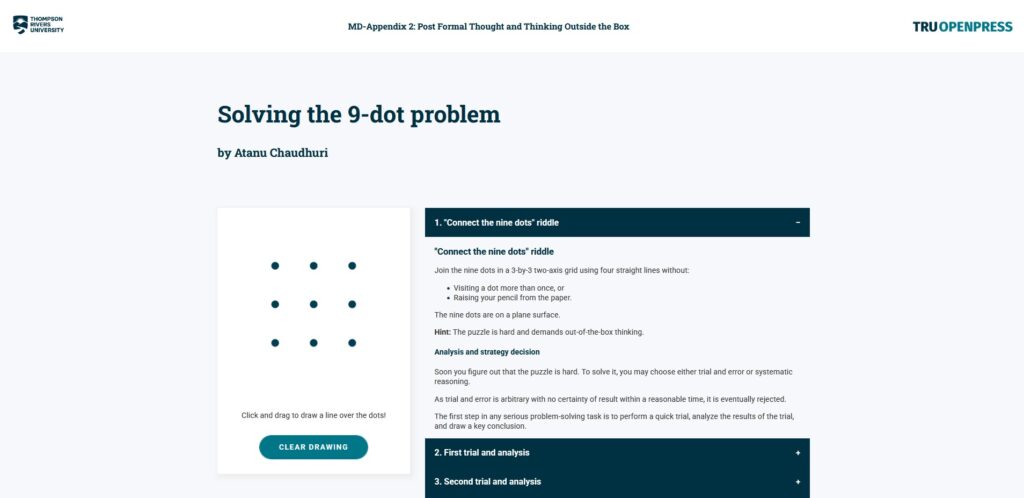
In the article, the reader is guided through a thought exercise and is invited to draw lines on an interactive canvas while they follow along. The layout of the webpage and the functionality of the canvas is explained below.
Layout #
Header #
The white, topmost banner at the top of the page containing the TRU and Open Press logos can be copy-pasted into other HTML documents with similar designs. It encompasses everything in the <header> tag in the file.
Body #
The article is divided into two main areas: the interactive canvas, and the accordion-style list with the numbered subheadings. The interactive canvas is contained within the <div> with the class “line-dot-activity”, and the accordion-style list is contained within the <div> with the class “activity-explanation”.
Interactive canvas #
The interactive canvas is composed of two <canvas> containers overlaid perfectly like two slices of bread:
- The <canvas> with ID “draw-canvas” holds the nine dots and any lines the user draws with their pointer.
- The <canvas> with ID “preview-canvas” only displays a preview line while the user is holding the mouse button down or dragging their finger across the canvas. This canvas is erased after the user stops holding the mouse button or stops touching the canvas and sits on top of the draw-canvas such that the user never “touches” the draw-canvas.


